UNBORED

UNBORED

Social media management and execution with a brain

Social media management and execution with a brain

See Live Project

MY ROLE

Lead Product Designer & Sole-Developer

Lead Product Designer & Sole-Developer

MY PARTNERS

Claude Opus 4.6 & Gpt 4.0 Codex

Claude Opus 4.6 & Gpt 4.0 Codex

TOOLS

FIGMA , CURSOR & CODEX

FIGMA , CURSOR & CODEX

TIMELINE

2026

2026

THE PROBLEM

The project started with a simple observation: small business owners and creators already know they need to post consistently on social media. They don't lack intent however they lack a workflow that doesn't drain their time. Existing scheduling tools solve the "where do I click to schedule a post" problem, but they don't solve the "I don't have time to think about this every day" problem.

The project started with a simple observation: small business owners and creators already know they need to post consistently on social media. They don't lack intent however they lack a workflow that doesn't drain their time. Existing scheduling tools solve the "where do I click to schedule a post" problem, but they don't solve the "I don't have time to think about this every day" problem.

EXTRA RESOURCES

If you would like to see the Market Research and Design systems in more details click the buttons here to the detailed notion pages

If you would like to see the Market Research and Design systems in more details click the buttons here to the detailed notion pages

Discovery and Research

Discovery and Research

The Genesis

The Genesis

This started with a key frustration. My cofounder (On another project) posts content for his side business daily , a fitness studio. On a Sunday afternoon , we are working together at a starbucks and I hear him cussing at his pc, I ask what’s wrong. He goes on a 10 minute rant and what I pick up from his rant is, he has been trying to schedule content for his side business but the tool he uses is too difficult use. He concludes by saying I just want to post my content 4 times a day why do i have to spend 12 minutes everyday setting that up. This instantly gave me and idea and I started looking for possible solutions.

This started with a key frustration. My cofounder (On another project) posts content for his side business daily , a fitness studio. On a Sunday afternoon , we are working together at a starbucks and I hear him cussing at his pc, I ask what’s wrong. He goes on a 10 minute rant and what I pick up from his rant is, he has been trying to schedule content for his side business but the tool he uses is too difficult use. He concludes by saying I just want to post my content 4 times a day why do i have to spend 12 minutes everyday setting that up. This instantly gave me and idea and I started looking for possible solutions.

Market Research

Market Research

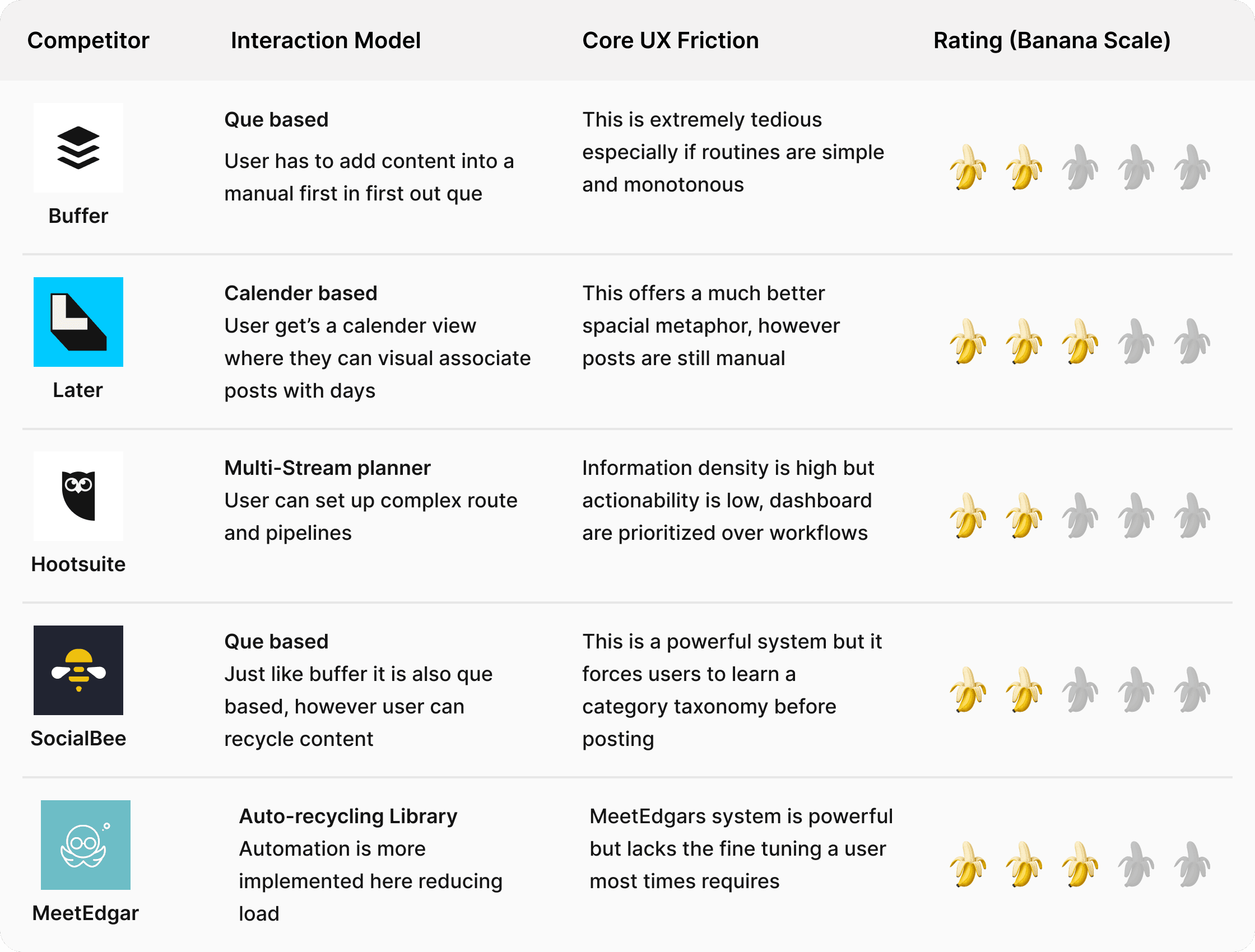
I conducted a competitive audit of five major competitors namely Buffer, Later, Hootsuite, SocialBee, and MeetEdgar. Next I mapped their interaction models by making extensive use of them myself. Every single one follows the same pattern of execution, the user acts as the operator of a dashboard. They pick dates, pick times, drag content, repeat. The cognitive load is on the user at every step.

I conducted a competitive audit of five major competitors namely Buffer, Later, Hootsuite, SocialBee, and MeetEdgar. Next I mapped their interaction models by making extensive use of them myself. Every single one follows the same pattern of execution, the user acts as the operator of a dashboard. They pick dates, pick times, drag content, repeat. The cognitive load is on the user at every step.

Competitive Audit Table

Competitive Audit Table

The Findings

The Findings

The competitive landscape proves there is a solid demand for this kind of product , but their UX assumption shares the exact same flaw which is the user should act as the scheduler. Not a single one of them considered the possibility of the user simply active as a director while the system itself acted as the scheduler.

The competitive landscape proves there is a solid demand for this kind of product , but their UX assumption shares the exact same flaw which is the user should act as the scheduler. Not a single one of them considered the possibility of the user simply active as a director while the system itself acted as the scheduler.

My Solution (Hypothesis)

My Solution (Hypothesis)

In order to make the user the key director and not the scheduler , i would have to change how information is inputed and how executions are made. The current products used a combination of input forms, calender inputs or queues , so my approach was to break this and use SENTENCES.

The hypothesis here was replacing replacing manual scheduling interactions with natural language input paired with an intelligent AI brain for interpretation and execution would collapse the multi-step , high cognitive-load workflow into a single expression of intent. In other words, the AI did all the heavy lifting, all the user had to do now was simply explain what they wanted and it was executed on the frontend and backend.

In order to make the user the key director and not the scheduler , i would have to change how information is inputed and how executions are made. The current products used a combination of input forms, calender inputs or queues , so my approach was to break this and use SENTENCES.

The hypothesis here was replacing replacing manual scheduling interactions with natural language input paired with an intelligent AI brain for interpretation and execution would collapse the multi-step , high cognitive-load workflow into a single expression of intent. In other words, the AI did all the heavy lifting, all the user had to do now was simply explain what they wanted and it was executed on the frontend and backend.

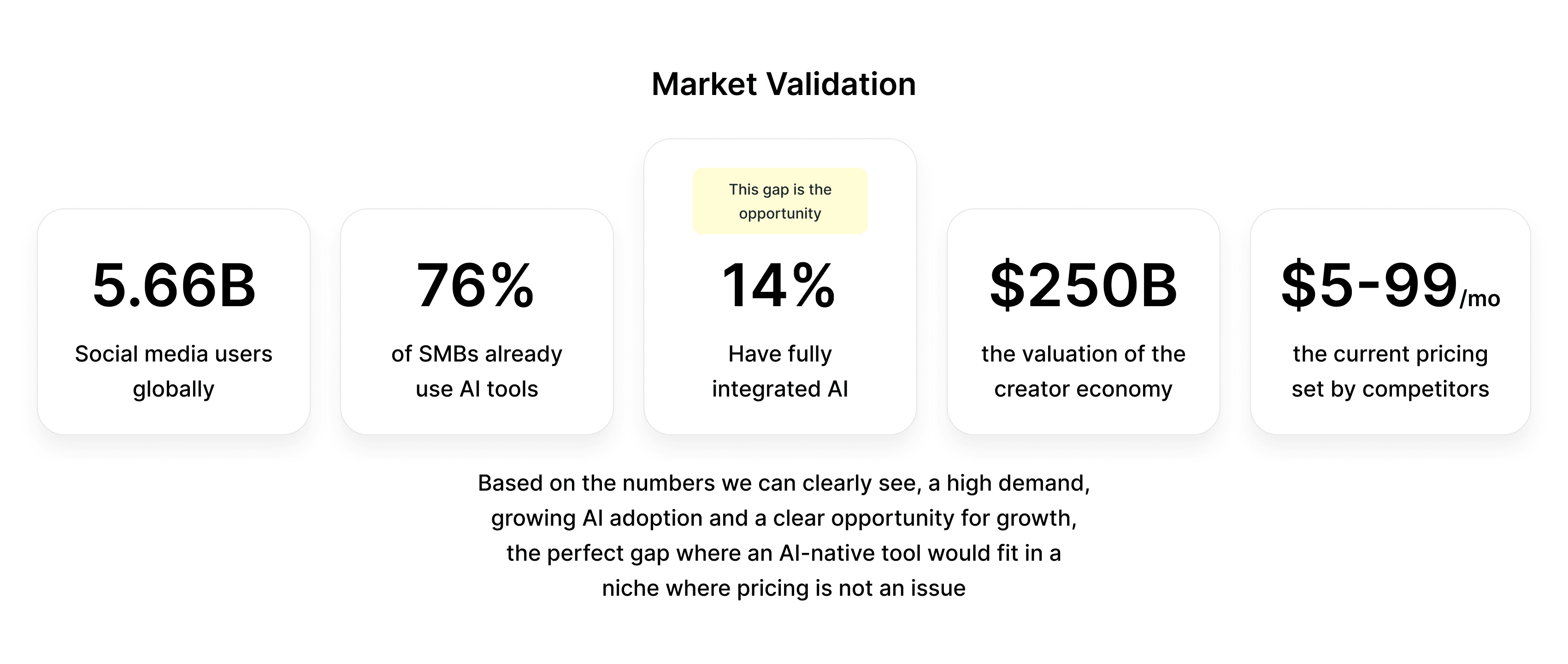
Would a solution like this even be adoptable?

Would a solution like this even be adoptable?

The numbers do not lie as you can see, there is wonderful adoption opportunity, the soil is fertile and its time to sow seeds.

The numbers do not lie as you can see, there is wonderful adoption opportunity, the soil is fertile and its time to sow seeds.

Design Strategy and Principles

Design Strategy and Principles

My Guiding Philosophy

My Guiding Philosophy

Intent over Interaction : Reduce the number of discrete decisions the user has to make. If the system can execute then the user doesn’t have to (Unless they want to).

Progressive Disclosure : Only show what matters at each stage. My product isn’t more complex than competitors, but by layering information, users always know what to do. This reduces cognitive overload, dampens perceived complexity, and makes the experience far more usable.

Familiar Spacial Metaphors : The use of a calender is not a new innovation, it was deliberately borrowed from Google Calender because the mental model is already learned. The innovation is the input and execution , not the output visualization.

Immediate Feedback : Every action produces a visible feedback with 150ms to 250ms ranging from loading states, click feedback, hovers etc. This keeps the user’s engaged retaining their attention as a result.
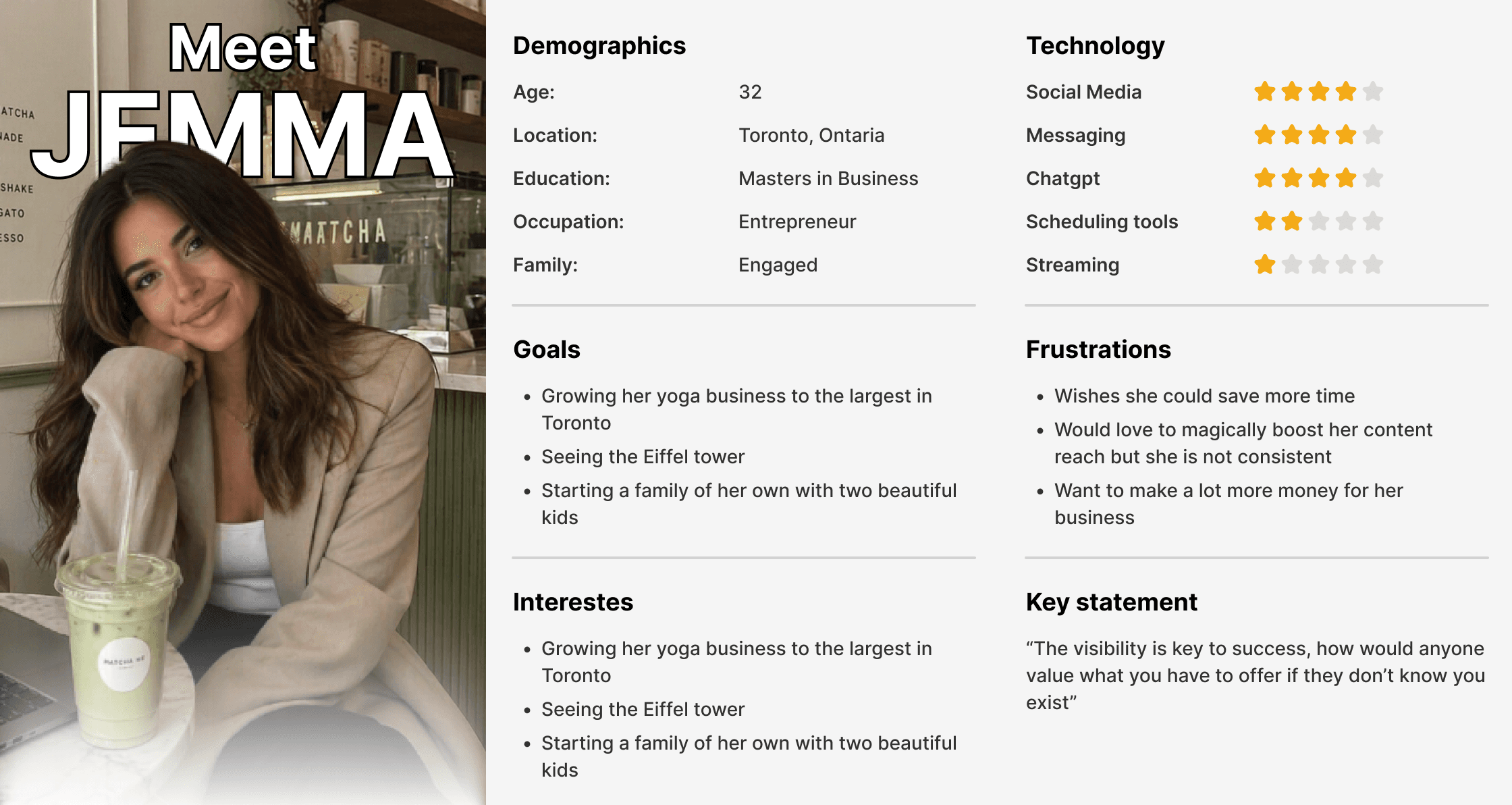
Target Persona

Target Persona

Information Architecture

Information Architecture

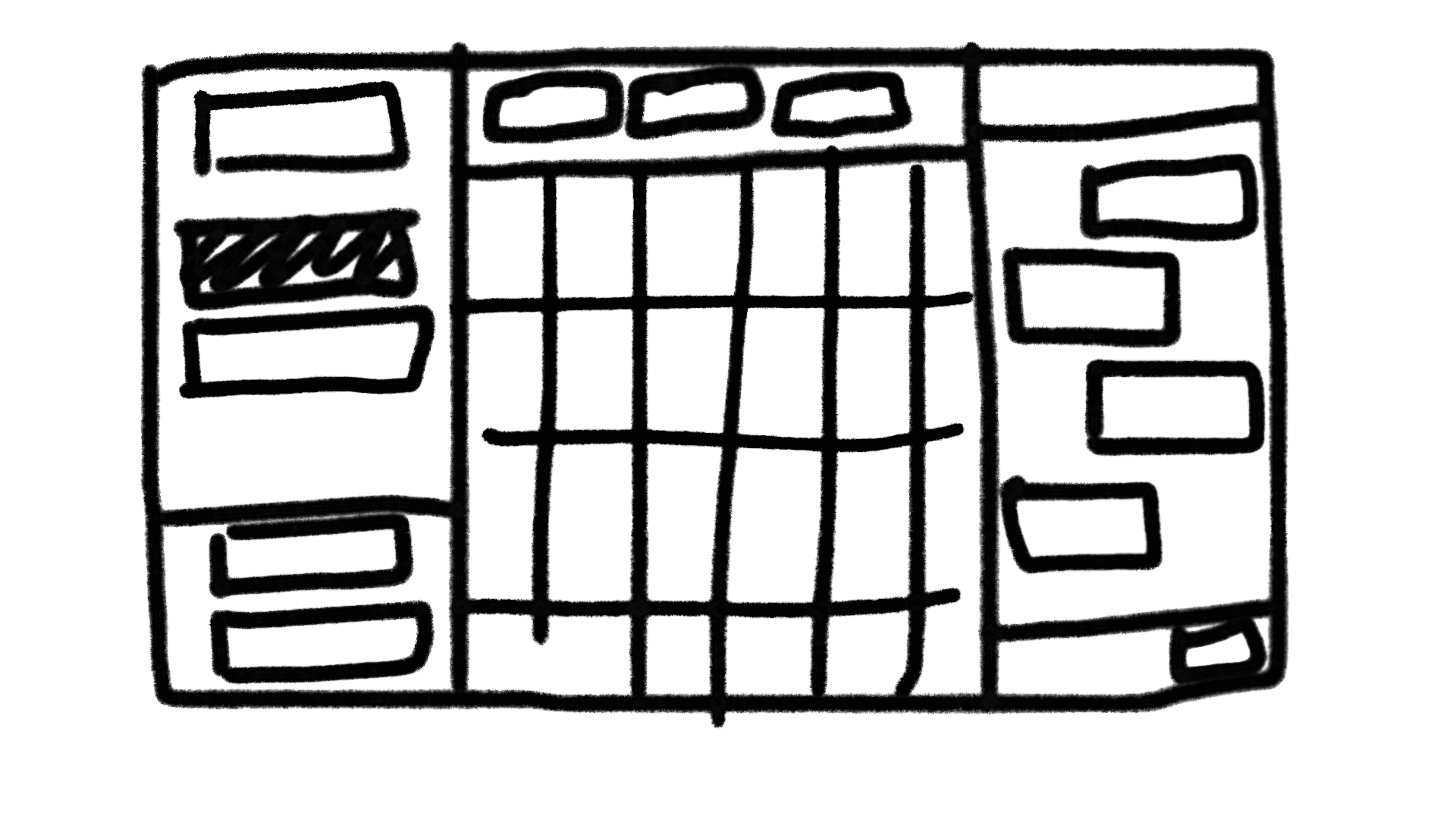
Wireframe

Structural Design

Structural Design

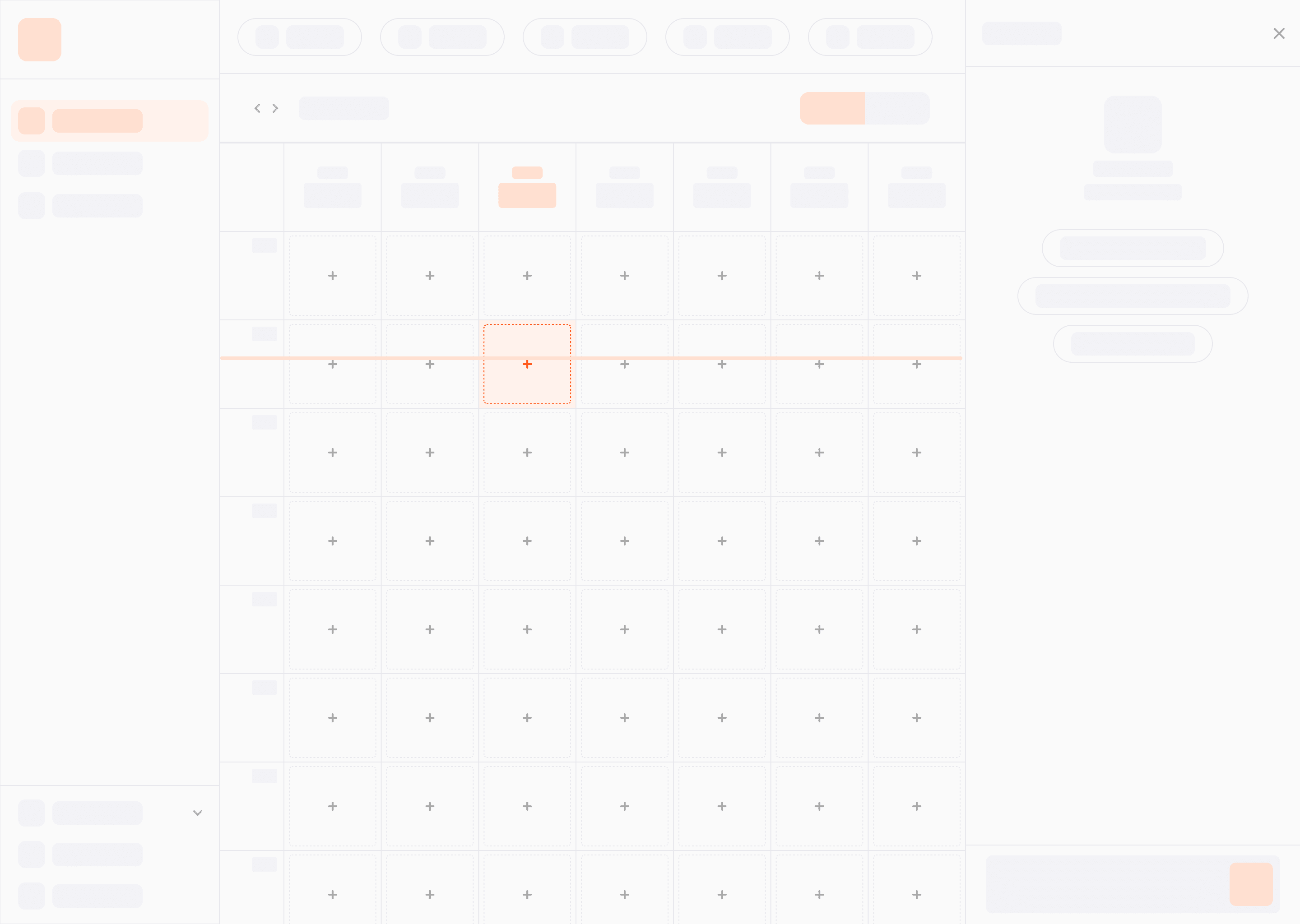
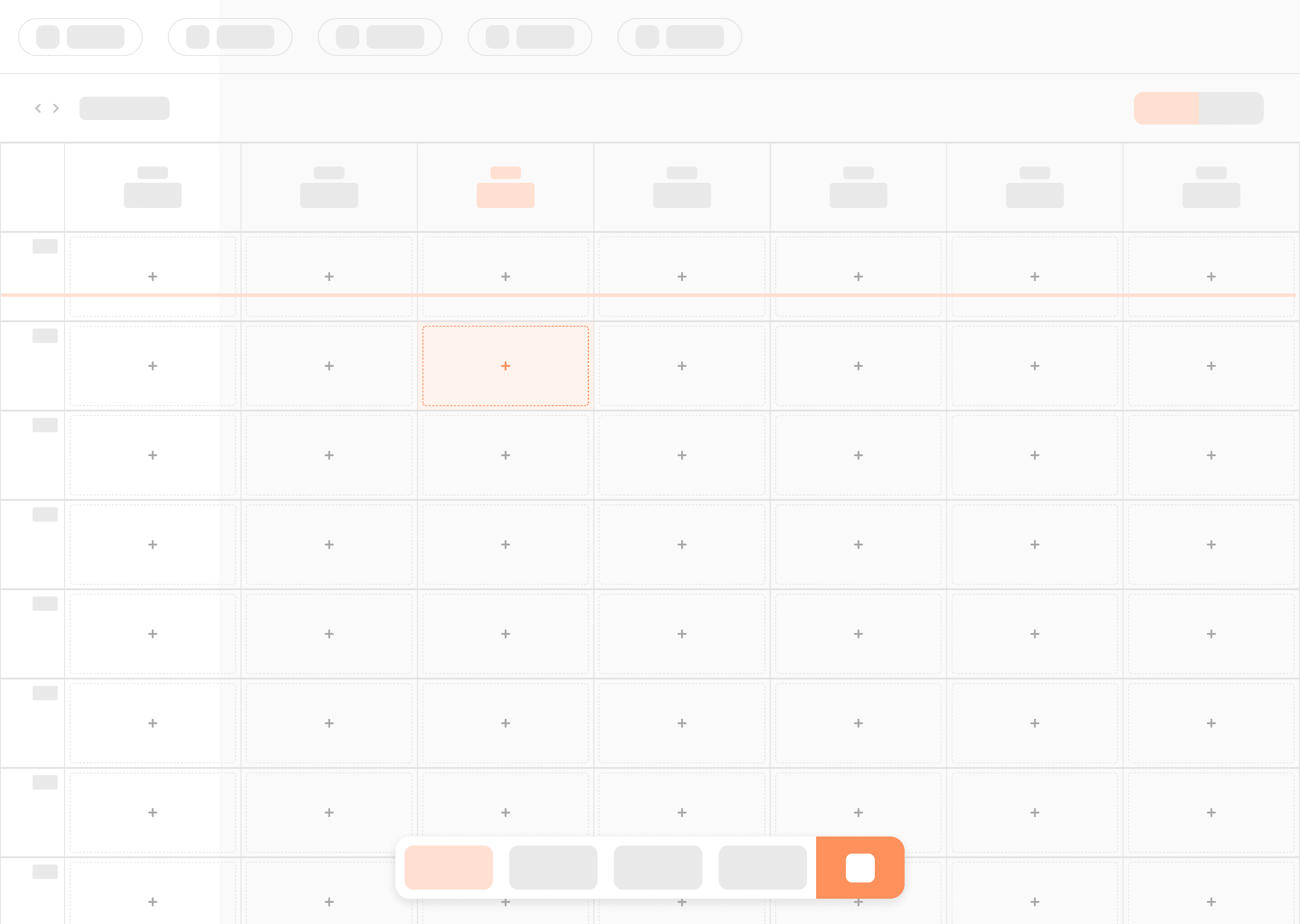
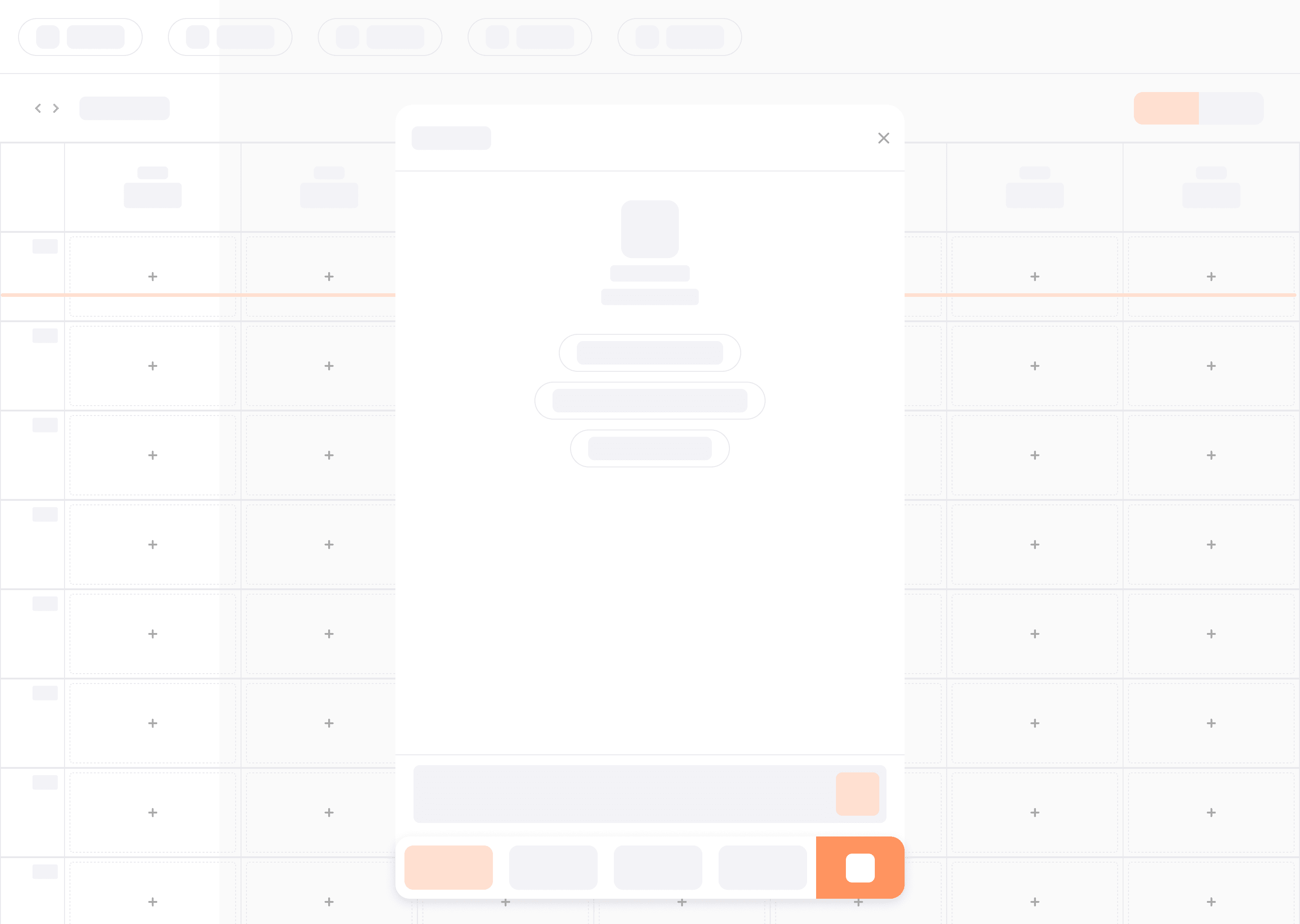
The Information Architecture went through two main iterations. The first version (documented in the original UX spec) used a bottom navigation bar with 4 tabs and AI conversation at the button which opened a bottom sheet for conversations. I move it to the navigation items to the left side bar and conversational layer to a collapsable modal plus fab on the right. These were my primary reasons for these changes

Vertical Scalability : A bottom nav caps at 4-5 items before horizontally scrolling or overflowing menus becomes necessary. While a side bar can have up to 8+ items without any sort of layout pressure

Profile Selector Placement : The side bar’s bottom section naturally accommodates a profile / workspace switcher , a pattern very commonly seen in tools like slack and linear.

Constant Visibility : With bottom sheet for AI conversations the problem became the sheet would always cover up significant portions of the calender where the routines were viewed and this posed a ux problem. Replacing it with a collapsible model allowed both views to be visible at all times.
Initial version

Initial version

Initial version

Initial version (with AI modal)

Initial version (with AI modal)

Initial version (with AI modal)

Current version

Current version

Current version

Current version (with AI modal)

Current version (with AI modal)

Current version (with AI modal)

Navigation Hierarchy

Navigation Hierarchy

The navigation follows a hum and spoke model, the side bar is the prominient hub , and each tab is the spoke with its own internal heirarchy. This helped to avoid deep nesting , the max depth i went with here was 2.

Unbored's Hub and Spoke navigation System

Unbored's Hub and Spoke navigation System

Visual Design

Visual Design

Design language & Choices

Design language & Choices

The visual language is minimal , light, and IOS-native. This was a deliberate not just an aesthetic preference ( as you can see there are logical reasons for this which are):

The target user spends a significant amount of their time on platforms such as instagram and in the IOS environment, it made sense from a UX perspective that the platform should communicate as an extension of environments they are familiar with.

What was not included was also as important as what was added, you may have noticed the absence of gradients, heavy shadows or decorative elements. This was done to reduce visual noice (another attempt at lightening cognitive load) , plus for this tool it made sense that the user’s most prominent visual points were their uploaded media and workspace.

Color System & Rationale

Color System & Rationale

The current palette is built on a semantic colors. Every single color has a communicative purpose

Snippet of Color Token System in Figma

Snippet of Color Token System in Figma

Key decisions behind the color system:

Orange ( #FF5A00 ) : High-Saturation warm hue for strong figure-ground contrast against the neutral palette. Also to avoid the over used blue used in SAAS and green which conflicts with success messaging. Orange also psychologically conveys energy (like ths sun) and urgency (without taking away from red for error messaging) a fitting color for a productivity tool.

IOS system colors: The target users live on instagram on their phones, green , red, yellow and blue already carry semantic meanings in their mental model. Borrowing learned associations , not teaching new ones.

Near Black (#111111) instead of pure black (#000000): This reduces harshness and eye strain while maintaining a 15.4:1 contrast ratio against white.

Critical Rule: Color is never the sole indicator of state. Every badge pairs color with a text label. Missing captions get a yellow border + ‘!’ icon + filterable pill. WCAG 1.4.1 compliance built into the design decision, not bolted on after.

Typography System

Typography System

I chose INTER for three key reasons:

Optimized for UI : Tall X - height, open apertures, and tabular number variants. Wonderful readability at small sizes (11-14px) in dense UI contexts like calender grids and meta cards.

Weight range : 400-800 this gives enough control for a type-only visual system. Weight does the heavy lifting that icons and color do in more ornate designs.

Platform-neutral familiarity : Visually close to SF Pro (Apple) and Roboto (Google) , it reads as being native on both platforms without actually being either one.

Snippet of Typography Token System in Figma

Snippet of Typography Token System in Figma

Interaction Design

Interaction Design

The AI panel : Reframing the Primary Interaction

The AI panel : Reframing the Primary Interaction

The most significant design decision in the product is what i chose as the primary input method. As previously stated all competitors make use of input forms, Calender input or queues as the entry point. Unbored uses a text input.

Unbored's AI Conversation panel

Unbored's AI Conversation panel

Slash commands: Bridging Novice and Expert users

Slash commands: Bridging Novice and Expert users

The slash command system (‘ /fill ’ , ‘ /clear ’ , ‘ /schedule ’ , ‘ /delete ’ , ‘ /rename ’ ) serves as a specific interaction design purpose, it bridges the gap between novies and expert users withing unbored interface.

The slash appears as a drop up menu (opening upwards from the input) because the input is at the bottom of the panel, using a drop down would simply render off screen making it unusable.

Unbored's Slash Nomenclature

Unbored's Slash Nomenclature

Responsive Design Strategy

Responsive Design Strategy

Adaptive vs Responsive

Adaptive vs Responsive

Unbored uses an adaptive approach rather than pure responsive scaling. At each breakpoint its content reorganizes instead of reflowing

Desktop (<768px): Three-column sidebar, + content + AI panel. Desktop users have viewport width or simultaneous context.

Tablet (500 - 768px): Bottom tabs replace the sidebar, a fitt’s law optimization. The bottom of the screen is the highest fidelity target area for thumbs. AI moves to a FAB because a persistent panel would have leave too little content width

Mobile (<500px): Information density reduces. Connect bar labels hide (icon-only). Today button hides. Chromes shrinks, content wins.

Tablet

Tablet

Tablet

Mobile

Mobile

Mobile

Desktop

Desktop

Desktop

Conclusion

Conclusion

Final notes

Final notes

Unbored so far has been a success in design and implementation and is still being iterated to be a better product by myself , claue, codex and voluntary testers. There’s a lot to build upon and there is so much more nuance that went into designing , planning and building this and much more coming, so far from user testing these are a list of features users have requested for.


Multi-turn conversational AI : The AI panel becomes a persistent chat thread with memory. The most difficult part of this may be showing a history without overwhelming the existing panel, so i am exploring collapsible message groups and last context summaries.

Nuance in captions per-platform : Same media, different captions. The biggest issue just like multi-turn conversational AI may be how to execute this without it becoming overwhelming visually.

Queue health indicator : A sort of gamified health bar that shows the status of the users content queue, so they know to upload / prepare more content or ask for recycling.

Dark mode: The token based-design architecture is what i already implemented, the only issue will be experimenting with colors and making sure they fit accessibility standards and user content remains visible against the new dark backgrounds.

Home

Create a free website with Framer, the website builder loved by startups, designers and agencies.